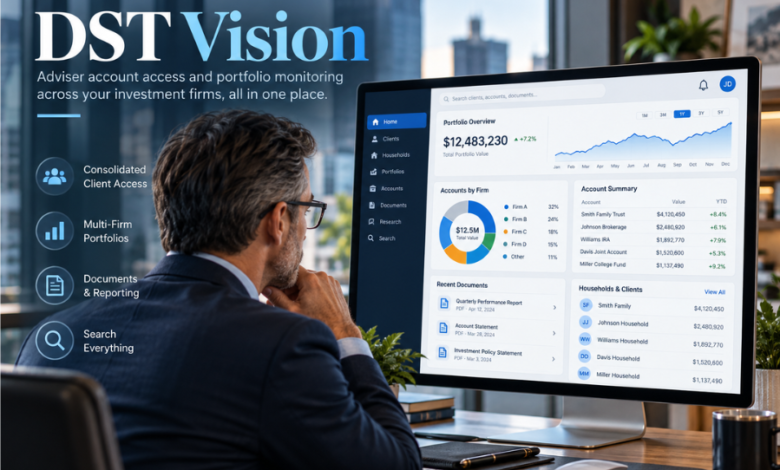
A financial adviser may oversee investments held with several fund managers, annuity providers and alternative investment companies. DST Vision offers a way to check many of those accounts without moving between each provider’s separate system. The professional portal brings authorised account information together, supporting portfolio reviews, client enquiries, reporting and selected servicing tasks.
Its value lies less in flashy technology than in something financial professionals need every day: dependable access to the right records. The platform remains relevant under SS&C Technologies, the financial technology company that acquired DST Systems in 2018. Yet it is not a universal investment dashboard, and not every user can perform every transaction. Understanding what the service connects, who may register and where its limits begin is essential to using it effectively.
The Problem It Was Built to Solve
Investment administration is rarely as tidy as a client’s portfolio summary. An adviser can recommend holdings from several fund families while the underlying accounts remain on different recordkeeping systems. That makes even simple checks laborious.
DST Vision addresses this fragmentation by offering a shared access point for participating investment companies. Instead of asking advisers to visit each fund manager separately, it can assemble information about accounts linked to their approved dealer, branch or representative credentials.
This arrangement matters during ordinary conversations. When a client asks whether a contribution arrived or how a holding changed, quick access to transaction history can make the difference between answering promptly and promising to call back.
What DST Vision Actually Is
The service is an online account-information and servicing portal for financial intermediaries. Its intended users include registered financial advisers, broker-dealers and authorised financial institutions, rather than members of the public seeking to manage personal investments independently.
It connects records from participating mutual fund, variable annuity and alternative investment providers. SS&C describes Vision as a single-sign-on platform serving more than 440 product companies and over 96,000 active monthly users.
An important distinction is that seeing multiple holdings together does not merge them into one account. The investments remain with their respective managers or administrators, under the arrangements applicable to each product. Vision provides a common window into authorised information and, where available, tools for particular account actions.
Accounts, Clients and Households
One of the platform’s defining features is the ability to navigate an adviser’s book of business by client name and household. This helps when investments belonging to the same person or family sit with different participating companies.
Depending on access and data availability, professionals can review account values, share positions, net asset values and recent activity. The mobile service also describes household-level asset views and searches by surname. The result is useful, though not a complete picture of anyone’s wealth.
Documents, Reports and Servicing
Vision also supports practical back-office work. Participating managers describe access to transaction histories, statements, tax documents, account reports and, in some cases, cost-basis information.
Certain transactions and maintenance functions may be available, including exchanges, specified distributions and systematic investment arrangements. Capabilities vary by product provider, account type, the firm’s restrictions and the user’s permission level. A function permitted for a retail mutual fund account may be unavailable for a retirement product or another company’s account.
Why Access Is Based on Your Professional Role
Vision is not an open consumer registration service. Participation is sponsored by investment companies, while each user must establish that they are entitled to the account information requested.
The distinction between permission levels is especially important. Representative access generally covers accounts attached to an adviser’s approved representative number. Branch access can extend to accounts associated with an authorised branch, while dealer-level access is intended for broker-dealer home offices. Other arrangements may apply to trust companies, tax-identification groups and third-party administrators.
It also explains why colleagues at the same organisation may see different information. Someone with branch access cannot assume they have every tool available to a representative, while an adviser cannot view an account simply because they know the client’s name.
SS&C advertises seven levels of security access protection. The exact permissions should be checked against the applicable provider’s arrangements rather than inferred from that headline figure.
Registering and Signing In
New users begin through the official Vision enrolment process. The application normally requires professional and firm details, an appropriate access category, and the participating companies for which access is requested. Depending on the category, applicants may need dealer, branch or representative identifiers and a sample client account or annuity contract number.
Access is not necessarily immediate. Invesco’s guidance says authorisation can take up to ten days, with approvals determined by the relevant management companies.
Once approved, the user signs in with a Vision ID and password. A professional who already holds an ID can generally request access to additional participating companies through the administrative options rather than creating an entirely separate identity for each one.
A useful precaution is to reach the sign-in page through the provider’s established official communications, especially when dealing with unsolicited emails. A convincing login screen alone is not proof that the page is legitimate.
When an Account Is Missing
A missing account may simply reflect an unapproved provider or a different representative number.
Changing broker-dealers, moving branches or operating under multiple representative codes can also affect the records displayed. Invesco advises professionals to review their current access and confirm the dealer, branch and representative details attached to the account.
Where information remains unavailable, the relevant product company or Vision support service is the appropriate route for checking authorisation. The portal’s view should not replace formal confirmations, statements or direct enquiries when account ownership, balances or transactions are disputed.
Security Is More Than a Password
Financial intermediary systems contain sensitive information, including names, balances and transaction records. Vision’s access model places boundaries around what an approved professional can see, while provider guidance describes encrypted web access and account-specific authorisation.
Those controls are meaningful, but they do not eliminate user responsibility. Firms must control credentials, update permissions and safeguard downloaded client documents.
Professionals should use their own authorised credentials, protect devices, avoid passing account information through unapproved channels and follow their firm’s security policies. When an unexpected access request or message appears, independently contacting the relevant support team is safer than following an unfamiliar sign-in prompt.
It is also worth distinguishing access security from data completeness. Strong authentication can restrict who enters the portal, but it cannot make every external product company participate or ensure that all records are available in the same format.
The SS&C Connection and How the Platform Developed
Vision began as a DST Systems service, reflecting the company’s wider role in financial account administration. Its history goes back well before the current interest in consolidated adviser dashboards.
In 2010, DST announced a collaboration with Blue Frog Solutions intended to support annuity order processing through Vision. Two years later, DST introduced Vision Nsite, an initiative that combined account management with product-company content, news and professional networking features. Historical announcements do not confirm that those features remain available today.
The larger corporate change came on 16 April 2018, when SS&C completed its acquisition of DST Systems. The transaction was announced at an enterprise value of approximately $5.4 billion, including assumed debt. The acquisition placed DST’s technology and servicing businesses within SS&C’s wider financial software operations.
Today, SS&C continues to market Vision as an adviser-servicing product. That continuity is more significant to users than the original corporate label: it identifies the current company behind the platform and the organisation responsible for its continuing commercial positioning.
Access Beyond the Desktop
Financial advice does not happen exclusively at an office desk. Meetings, travel and urgent client enquiries create demand for mobile account access, particularly when a professional needs to check a holding rather than complete a lengthy administrative process.
The DST Vision Android app, described as Vision Mobile, is published under DST Systems. Its store description includes searching clients and households, reviewing account values and positions, and browsing transaction history with existing Vision credentials. The listing records an update in August 2025.
Users should check which functions are supported on their device and avoid assuming that sensitive transactions can be completed through the app merely because account data is visible.
Where the Convenience Ends
The greatest strength of an aggregated portal is also its clearest limitation: it can consolidate only information that participating companies make available to an authorised user. Assets held elsewhere may require a custodian website, a product-specific service or another reporting tool.
Different providers can also expose different activities. Capital Group, for example, distinguishes tasks available in its own Client Accounts area from those offered through DST Vision. That separation is a reminder that a shared login does not create identical capabilities across every institution.
An account overview is useful for preparation and service, but investment decisions require appropriate product documents, up-to-date valuations and a fuller understanding of the client’s circumstances. Nor does a convenient view of holdings replace record reconciliation or a firm’s compliance obligations.
Why It Still Matters in Wealth Management
Modern financial advice is often described in terms of investment strategy, personal relationships and long-term planning. Yet much of the work that makes those services possible happens in routine administration: confirming ownership, obtaining paperwork, identifying transactions and responding accurately to enquiries.
Vision illustrates the practical value of infrastructure that clients may never see. It can redirect effort from collecting information towards understanding it.
Its continued relevance also reflects a wider tension in financial technology. Advisers want a coherent view of the client, while investments remain distributed across products, institutions and regulatory arrangements.
Conclusion
DST Vision is best understood as a professional access and servicing layer, not a standalone investment account or a public wealth-management app. It brings participating product-company records into a shared environment, with usefulness shaped by authorisation, coverage and available functions.
For advisers, the question is not simply whether the platform provides a single sign-in. It is whether the accounts they are responsible for appear accurately, whether the tools match their tasks and whether sensitive information is handled appropriately.
FAQs
Who can use DST Vision?
The service is intended for authorised financial intermediaries, including advisers, broker-dealers and eligible institutions. Access depends on professional identifiers and approval for specific investment companies or accounts. Individual investors normally use the investor portal supplied by their fund manager, administrator or financial institution.
Is DST Vision free for financial advisers?
Participating management companies sponsor access, and the platform’s official enrolment information says there is no charge to authorised intermediaries for Vision access. That does not mean investment products or advisers’ other software services are free; those may have separate fees and agreements.
Why can’t I see every client investment?
The missing holding may be with a non-participating provider, or your account permissions may not match the relevant dealer, branch or representative records. Confirm that the company has been added to your access, then ask the relevant provider or support team to investigate continuing gaps.
Can advisers carry out transactions through DST Vision?
Some transactions, including certain exchanges, distributions or account servicing changes, can be supported. Their availability depends on the investment company, product, account type, authorised access level and the adviser’s firm. Viewing an account does not automatically grant permission to trade or alter its details.
Is there a DST Vision mobile app?
An Android app called DST Vision is listed under DST Systems. It offers access to selected account details, household views and transaction histories using existing credentials. Advisers should confirm present compatibility and permissions before relying on it for day-to-day servicing.