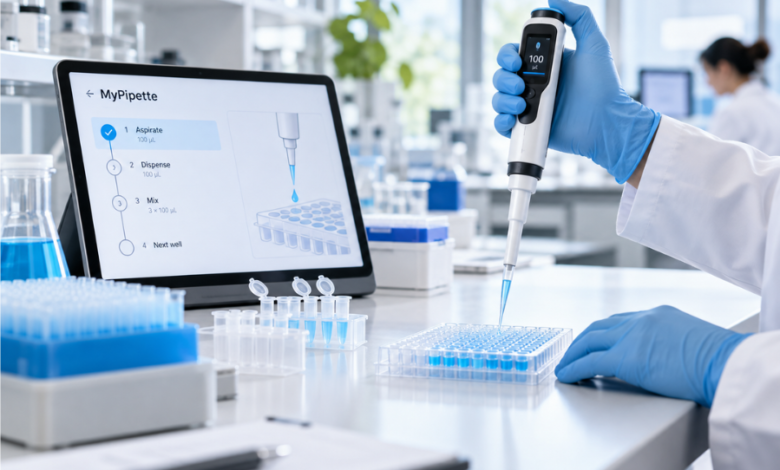
MyPipette is best understood in the laboratory context as Thermo Fisher Scientific’s connected pipetting ecosystem, centred on the web-based My Pipette Creator application. Rather than replacing the physical pipette, the software adds a digital layer for creating, storing, transferring and sharing pipetting programs used with compatible electronic instruments. That distinction matters because online descriptions sometimes blur the line between the app and the pipette itself.
First introduced in 2017 alongside Bluetooth-enabled E1-ClipTip electronic pipettes, My Pipette Creator was designed to reduce repetitive on-device programming and make protocols easier to standardise across researchers and laboratories. The platform remains relevant today because Thermo Fisher now supports both E1-ClipTip and FluidEase Pro ClipTip electronic pipettes, extending the original idea of connected pipetting into a broader liquid-handling workflow.
What MyPipette Actually Refers To
The term “mypipette” is often used informally in searches, but the verified Thermo Scientific product name is My Pipette Creator. It is a web-based application available through the Thermo Fisher Connect platform. Users can create pipetting programs on a computer, save them online, move them to compatible electronic pipettes and share programs with colleagues.
This is not a generic smart pipette brand, nor is it an autonomous liquid-handling robot. The physical work is still performed by an electronic pipette operated by a laboratory user. My Pipette Creator is the software environment that helps organise and deploy the programmed steps behind that work.
Why Connected Pipetting Became Important
Electronic pipettes can reduce repetitive actions, but programming complex sequences on a handheld instrument can still be slow. Multi-step workflows may require volumes, speeds, mixing actions and dispensing sequences to be entered through the pipette interface.
Thermo Fisher launched My Pipette Creator in March 2017 to shift much of that programming to a computer. The company presented it as the first cloud-based application built for electronic-pipette connectivity: develop a program once, store it centrally and transfer it when needed.
That approach also addressed a wider laboratory problem. Reproducibility depends on far more than software, but procedural consistency matters. If different operators enter different settings or interpret a complex liquid-handling protocol differently, avoidable variation can be introduced before the experiment itself is even considered.
How My Pipette Creator Works
The platform connects the user’s Thermo Fisher Connect account with a compatible pipette. A Windows utility called My Pipette Connect Utility acts as the bridge between the web application and the physical instrument.
After a pipette is linked, users can create programs, save them in their account, move programs between the app and the instrument, and access shared or ready-made protocols. Programs created in the application use the “.ei” file extension.
Building Matrix and Preset Programs
My Pipette Creator supports programming functions associated with compatible electronic pipettes, including Matrix and Preset workflows. Matrix programming is useful for building a sequence step by step. Individual actions can be added, reordered or deleted, and the application can manage details that would otherwise be entered through the pipette.
For laboratories running the same procedure repeatedly, the benefit is not that programming becomes scientifically automatic. It is that the programmed instructions can be prepared in a larger interface, reviewed more easily and reused without recreating every step from scratch.
If a Matrix sequence would leave liquid in the pipette, the program can add a purge step, supporting operational consistency without replacing laboratory judgement.
Transferring and Sharing Programs
Programs can be transferred between My Pipette Creator and connected E1-ClipTip or FluidEase Pro ClipTip pipettes. The official workflow allows users to drag programs from personal, shared or recent-program areas into the connected instrument.
There are practical limits. Programs are transferred to one pipette at a time, even though multiple compatible pipettes can be managed through the application. Up to ten programs can be moved at once into the Programs area.
Sharing is another important feature. A program can be shared with colleagues through their Thermo Fisher accounts. Recipients can use the shared program on a compatible pipette, while editing generally requires saving a copy first. This helps preserve the original shared version while still allowing local adaptation.
The Protocol Library Is the Strongest Time-Saving Feature
One of MyPipette’s most useful elements is the Protocol Library. Thermo Fisher provides pre-programmed pipetting protocols developed for selected assays, reagent kits and common laboratory applications.
Instead of translating a written protocol into pipette commands manually, a researcher can locate an available protocol, save it to their account and transfer the relevant program to a compatible instrument. Thermo Fisher says these programs are written and tested by its applications specialists for the associated workflows.
The value is especially clear in repetitive kit-based procedures. Reducing manual data entry can shorten setup and decrease the chance of a programming mistake. It can also make training easier when multiple people need to execute the same pipetting sequence.
However, a pre-programmed protocol does not remove the need to verify that the selected program matches the exact assay, pipette model, volume range, tips and laboratory procedure being used. Software standardisation is only useful when the underlying method is correct.
Which Pipettes Are Compatible With MyPipette?
Current Thermo Fisher information identifies the E1-ClipTip and FluidEase Pro ClipTip electronic pipette families as compatible with My Pipette Creator, subject to software requirements. The company specifies software version 1.28 or later for supported models.
Bluetooth-enabled instruments can connect wirelessly, while cable connections are also supported. E1-ClipTip models use a micro-USB connection, while current FluidEase Pro documentation describes USB-C connectivity. Older E1-ClipTip pipettes with software version 1.27 or earlier may require an upgrade path before they can work with My Pipette Creator.
The application itself is browser-based, so programs can be created or edited through common desktop operating systems. The important limitation is the physical connection layer: the My Pipette Connect Utility used for communication with the pipette is Windows-based.
In practice, a Mac user may be able to work with programs in the browser but needs an appropriate Windows PC for direct program transfer to or from the instrument. Laboratories planning shared workstations therefore need to consider software compatibility as well as pipette hardware.
What MyPipette Can Improve in a Laboratory
The clearest advantage is standardisation. A laboratory can prepare a defined program, retain it centrally and distribute the same instructions to colleagues rather than asking each operator to rebuild the sequence independently.
The second benefit is efficiency. Programming on a computer can be faster and easier to review than navigating a small instrument screen, particularly for long or multi-step protocols. The cloud-based library also avoids relying only on the storage capacity of an individual pipette.
A third benefit is collaboration. Shared programs give teams a common digital starting point for recurring workflows, reducing informal handovers of settings through notes or screenshots.
There is also an ergonomic argument. E1-ClipTip electronic pipettes were designed with electronic tip ejection and index-finger pipetting controls, while My Pipette Creator moves programming away from repeated handheld menu navigation. Neither feature removes all ergonomic risk, but together they can reduce some repetitive actions associated with intensive pipetting work.
Standardised digital programs can be particularly useful in laboratories where several researchers perform the same workflow. Training still matters, but reducing repeated manual setup gives supervisors one fewer variable to manage when establishing a consistent procedure.
What MyPipette Does Not Replace
Connected software should not be confused with calibration, maintenance or good pipetting technique. Accuracy still depends on the condition of the pipette, the suitability and fit of the tips, correct volume selection, liquid properties, operator technique, environmental conditions and adherence to maintenance and calibration requirements.
My Pipette Creator also does not turn a handheld pipette into a fully automated workstation. A person still performs the transfer. Laboratories handling very high throughput, complex plate workflows or unattended liquid handling may require dedicated automation rather than a connected handheld instrument.
The online requirement matters as well. Thermo Fisher states that My Pipette Creator cannot be used offline. Organisations with restricted networks, tightly controlled IT environments or specialised data-governance policies therefore need to assess compatibility with their infrastructure before relying on the platform.
Another distinction is important for laboratories assessing digital tools: storing a pipetting program does not automatically create a complete record of every experimental action. Organisations operating under formal quality systems should determine how My Pipette Creator fits within their existing documentation, validation and record-management processes rather than assuming connectivity alone meets those requirements.
Setting Up My Pipette Creator in Practice
The basic setup begins with a Thermo Fisher Connect account. The user then opens My Pipette Creator, installs the My Pipette Connect Utility on a Windows PC and connects the compatible pipette by Bluetooth or the appropriate USB cable.
The pipette is then linked to the user’s cloud account. Thermo Fisher’s system uses user profiles on the instrument, allowing different profiles to be associated with different cloud accounts. E1-ClipTip documentation describes up to five user profiles, which can be useful where an instrument is shared by several researchers.
Once linked, users can create programs, retrieve library content, transfer programs and manage software updates for supported pipettes. A laboratory does not need to create every workflow from zero: an existing program can provide a starting point, while appropriate protocols from the library can be saved and adapted when necessary.
For teams introducing the platform more widely, a controlled approach is sensible. Establish naming conventions, define who owns master programs, keep validated versions separate from experimental edits and confirm the program loaded on the pipette before running valuable samples.
These procedural details may sound mundane compared with the technology itself, but they determine whether digital protocol management creates genuine consistency or simply produces another collection of poorly named files.
Why MyPipette Still Matters in 2026
My Pipette Creator is no longer simply a launch-era companion for one electronic pipette family. Thermo Fisher’s current product material now presents it alongside both E1-ClipTip and FluidEase Pro ClipTip instruments, showing that the connected-programming concept remains part of the company’s liquid-handling strategy.
Its continued relevance reflects a broader shift in laboratory work: methods increasingly sit in digital ecosystems where they can be stored, shared and updated instead of remaining on a single device.
The strongest case for MyPipette is therefore operational rather than futuristic. It gives compatible electronic pipettes a more organised way to handle programmed methods, making routine workflows easier to reproduce and distribute without pretending that software alone guarantees experimental quality.
For laboratories already invested in compatible Thermo Scientific hardware, that integration can be more important than headline-grabbing automation. Small reductions in setup time, reprogramming and procedural inconsistency become meaningful when the same liquid-handling tasks are repeated across large numbers of experiments.
Conclusion
MyPipette, in the Thermo Scientific laboratory context, is primarily My Pipette Creator: a web-based tool for programming, storing, transferring and sharing workflows used with compatible electronic pipettes. Its importance lies in connecting everyday liquid handling with centralised protocol management.
For teams using E1-ClipTip or FluidEase Pro ClipTip instruments, the platform can reduce repetitive programming, support consistent methods and simplify access to ready-made protocols. Its limitations are equally important: it requires online access, direct instrument connectivity depends on Windows, and it does not replace calibration, technique or full laboratory automation.
Used within those boundaries, My Pipette Creator represents a practical form of laboratory digitalisation. Its value comes less from changing what pipettes fundamentally do and more from improving how programmed liquid-handling methods are created, maintained and shared.
FAQs
What is MyPipette?
MyPipette usually refers to Thermo Fisher Scientific’s My Pipette Creator application in a laboratory context. It is a web-based tool within Thermo Fisher Connect that lets users create, store, transfer and share pipetting programs for compatible Thermo Scientific electronic pipettes.
Is MyPipette a physical pipette?
No. My Pipette Creator is software, not the pipette itself. It works with compatible electronic pipettes, including supported E1-ClipTip and FluidEase Pro ClipTip models. The researcher still uses the physical instrument to carry out liquid transfers; the app helps manage the programmed workflow.
Which pipettes work with My Pipette Creator?
Thermo Fisher currently identifies compatible E1-ClipTip and FluidEase Pro ClipTip electronic pipettes running supported software, generally version 1.28 or later. Bluetooth and USB connections are available depending on the model. Older E1-ClipTip units may need a software upgrade before they can connect.
Can My Pipette Creator be used on a Mac?
The web application can be accessed through common browsers on Mac as well as Windows. However, the My Pipette Connect Utility that links the physical pipette to the cloud is Windows-based. That means direct program transfers between the app and pipette require a supported Windows PC.
Does MyPipette improve pipetting accuracy?
It can improve workflow consistency by reducing repeated manual programming and by distributing standardised protocols, but it does not independently guarantee accurate pipetting. Accuracy still depends on correct technique, suitable tips, pipette condition, calibration, maintenance, environmental factors and appropriate method design.